
远程桌面3389端口修改器,可以自动设置防火墙。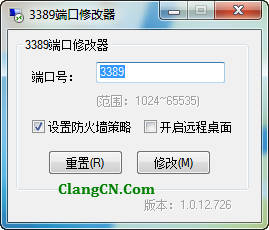
#cs ____________________________________ AU3 版本: AutoIt3.3.9.0-1 脚本作者: Clang Email: admin@clang.cn QQ/TM: 4370001 脚本版本: 1.0.12.0726 脚本功能: 3389端口修改器 支持系统: /WinNT/2000/XP/2003/Win7/2008/Win8 #ce _______________脚本开始_________________
工具下载:Modify3389.exe
程序源码:
#NoTrayIcon
#Region ;**** 参数创建于 ACNWrapper_GUI ****
#PRE_Icon=ico.ico
#PRE_Outfile=Modify3389.exe
#PRE_Compression=4
#PRE_UseX64=n
#PRE_Res_Comment=3389端口修改器 1.0.12.0726
#PRE_Res_Description=3389端口修改器 1.0.12.0726
#PRE_Res_Fileversion=1.0.12.0726
#PRE_Res_LegalCopyright=╃苍狼山庄╃
#PRE_Res_Field=产品版本|1.0.12.0726
#PRE_Res_Field=产品名称|3389端口修改器 1.0.12.0726
#PRE_Res_Field=源文件名|Modify3389.exe
#PRE_Res_Field=内部名称|Modify3389.exe
#PRE_Res_Field=主页|https://clang.cn
#PRE_Res_Field=作者|Clang
#EndRegion ;**** 参数创建于 ACNWrapper_GUI ****
#cs ____________________________________

 AU3 版本: AutoIt3.3.9.0-1
 脚本作者: Clang
 Email: admin@clang.cn
 QQ/TM: 4370001
 脚本版本: 1.0.12.0726
 脚本功能: 3389端口修改器

#ce _______________脚本开始_________________
#include <ButtonConstants.au3>
#include <EditConstants.au3>
#include <GUIConstants.au3>
#include <GUIConstantsEx.au3>
#include <StaticConstants.au3>
#include <WindowsConstants.au3>
#include <Process.au3>

Opt("TrayAutoPause", 0)        ;把系统自动的单击暂停去掉

Global Const $CrVer = FileGetVersion(@AutoItExe)
Global Const $strName = "3389端口修改器"

If WinExists($strName) Then
    WinActivate($strName)
    Exit ; 此脚本已经运行了
EndIf
AutoItWinSetTitle($strName)
_ReduceMemory(@AutoItPID)

#Region ### START Koda GUI section ### Form=d:\users\clang\desktop\modify 3389\form1.kxf
$Form1 = GUICreate($strName , 253, 192, (@DesktopWidth - 253) / 2, (@DesktopHeight - 192) / 2, BitOR($WS_SYSMENU,$WS_MINIMIZEBOX,$WS_CAPTION,$WS_POPUP,$WS_POPUPWINDOW,$WS_BORDER,$WS_CLIPSIBLINGS))
$Group1 = GUICtrlCreateGroup("3389端口修改器", 8, 8, 233, 153)
$ipDuankou = GUICtrlCreateInput("", 88, 32, 129, 21, BitOR($GUI_SS_DEFAULT_INPUT,$ES_NUMBER))
$btModify = GUICtrlCreateButton("修改(&M)", 128, 120, 75, 25)
$cbEnableFirewall = GUICtrlCreateCheckbox("设置防火墙策略", 24, 88, 105, 17)
$cbEnableRM = GUICtrlCreateCheckbox("开启远程桌面", 136, 88, 97, 17)
$btReset = GUICtrlCreateButton("重置(&R)", 40, 120, 75, 25)
$lbDuankouhao = GUICtrlCreateLabel("端口号:", 24, 40, 52, 17)
$lbFanwei = GUICtrlCreateLabel("(范围:1024~65535)", 88, 64, 130, 17)
GUICtrlSetState(-1, $GUI_DISABLE)
GUICtrlCreateGroup("", -99, -99, 1, 1)
$lbVer = GUICtrlCreateLabel("版本:0.00.00.0000", 136, 168, 103, 17)
GUICtrlSetState(-1, $GUI_DISABLE)

;设置提示
GUICtrlSetTip($ipDuankou, "填写要更改的端口号,范围1024~65535。")
GUICtrlSetTip($cbEnableFirewall, "勾选则自动添加新端口到Windows 防火墙策略中。")
GUICtrlSetTip($cbEnableRM, "勾选则开启远程桌面,不勾选则关闭远程桌面。")

_Reset();初始数据

GUISetState(@SW_SHOW)
#EndRegion ### END Koda GUI section ###

While 1
    $nMsg = GUIGetMsg()
    Switch $nMsg
        Case $GUI_EVENT_CLOSE
            Exit

        Case $btModify
            GUICtrlSetState($ipDuankou, $GUI_DISABLE)
            GUICtrlSetState($cbEnableFirewall, $GUI_DISABLE)
            GUICtrlSetState($cbEnableRM, $GUI_DISABLE)
            GUICtrlSetState($btModify, $GUI_DISABLE)
            GUICtrlSetState($btReset, $GUI_DISABLE)
            If Number(GUICtrlRead( $ipDuankou )) < Number(1024) Or  Number(GUICtrlRead( $ipDuankou )) > Number(65535) Then
                GUICtrlSetState($ipDuankou, $GUI_FOCUS)
                MsgBox(0+16+262144,$strName,"输入的数值错误,请重新输入!")
            Else
                RegWrite('HKEY_LOCAL_MACHINE\SYSTEM\CurrentControlSet\Control\Terminal Server\Wds\rdpwd\Tds\tcp','PortNumber','REG_DWORD',GUICtrlRead( $ipDuankou )) ;修改3389端口
                RegWrite('HKEY_LOCAL_MACHINE\SYSTEM\CurrentControlSet\Control\Terminal Server\WinStations\RDP-Tcp','PortNumber','REG_DWORD',GUICtrlRead( $ipDuankou )) ;修改3389端口

                If GUICtrlRead($cbEnableRM) = 1 Then
                    RegWrite('HKEY_LOCAL_MACHINE\SYSTEM\CurrentControlSet\Control\Terminal Server','fDenyTSConnections','REG_DWORD','0') ;启用远程桌面
                Else
                    RegWrite('HKEY_LOCAL_MACHINE\SYSTEM\CurrentControlSet\Control\Terminal Server','fDenyTSConnections','REG_DWORD','1') ;禁用远程桌面
                EndIf
                If Number(_WinVersion(0)) > Number(5) And Number(_WinVersion(0)) < Number(6) Then
                    If GUICtrlRead($cbEnableFirewall) = 1 Then
                        _RunDos('netsh firewall add portopening protocol = TCP port ='  & GUICtrlRead( $ipDuankou ) & ' name = "Remote Desktop by 3389Modify (TCP-In)"')
                     Else
                        _RunDos('netsh firewall delete portopening protocol = TCP port ='  & GUICtrlRead( $ipDuankou ))
                    EndIf
                ElseIf Number(_WinVersion(0)) >= Number(6) Then
                    If GUICtrlRead($cbEnableFirewall) = 1 Then
                        _RunDos('netsh advfirewall firewall add rule name="Remote Desktop by 3389Modify (TCP-In)" protocol=TCP dir=in localport=' & GUICtrlRead( $ipDuankou ) & ' action=allow')
                     Else
                        _RunDos('netsh advfirewall firewall delete rule name="Remote Desktop by 3389Modify (TCP-In)"')
                    EndIf
                EndIf


                MsgBox(0+64+262144,$strName,"修改完成,请重新启动您的计算机!")
            EndIf
            GUICtrlSetState($ipDuankou, $GUI_ENABLE)
            GUICtrlSetState($cbEnableFirewall, $GUI_ENABLE)
            GUICtrlSetState($cbEnableRM, $GUI_ENABLE)
            GUICtrlSetState($btModify, $GUI_ENABLE)
            GUICtrlSetState($btReset, $GUI_ENABLE)
        Case $btReset
            _Reset()
    EndSwitch
WEnd


;初始化数据
Func _Reset()
    $flagPort = RegRead ( "HKEY_LOCAL_MACHINE\SYSTEM\CurrentControlSet\Control\Terminal Server\Wds\rdpwd\Tds\tcp", "PortNumber" )
    $flagRM = RegRead ( "HKEY_LOCAL_MACHINE\SYSTEM\CurrentControlSet\Control\Terminal Server", "fDenyTSConnections" )
    GUICtrlSetData($ipDuankou, $flagPort)
    GUICtrlSetState($cbEnableFirewall,$GUI_CHECKED)
    If $flagRM = 1 Then
        GUICtrlSetState($cbEnableRM,$GUI_UNCHECKED)
    Else
        GUICtrlSetState($cbEnableRM,$GUI_CHECKED)
    EndIf
    GUICtrlSetData($lbVer, "版本:" & $CrVer)
EndFunc

;获取系统版本
Func _WinVersion($retAsString = 0)
    Local $dwVersion = DllCall("kernel32.dll", "dword", "GetVersion")
    Local $versionStr = String(BitAND($dwVersion[0], 0x00FF))
    $versionStr &= "." & String(BitShift(BitAND($dwVersion[0], 0xFF00), 8))
    If $retAsString Then Return $versionStr
    Return Number($versionStr)
EndFunc  ;==>_WinVersion

;======内存释放======
Func _ReduceMemory($i_PID = -1);内存释放函数 该函数抄自ACN论坛(http://autoit.net.cn)
    If $i_PID <> -1 Then
        Local $ai_Handle = DllCall("kernel32.dll", 'int', 'OpenProcess', 'int', 0x1f0fff, 'int', False, 'int', $i_PID)
        Local $ai_Return = DllCall("psapi.dll", 'int', 'EmptyWorkingSet', 'long', $ai_Handle[0])
        DllCall('kernel32.dll', 'int', 'CloseHandle', 'int', $ai_Handle[0])
    Else
        Local $ai_Return = DllCall("psapi.dll", 'int', 'EmptyWorkingSet', 'long', -1)
    EndIf
    Return $ai_Return[0]
EndFunc   ;==>_ReduceMemory
评论 (0)
评论已关闭